Yiwu Market District 2 Guide
Bags, umbrellas, hardware and electronics — floors, product checks and a practical buying route.

What can you buy in District 2?
Start in Yiwu Market District 2 if you are sourcing bags, umbrellas, hardware, electrical products, kitchen and bathroom hardware, small appliances or electronics. Choose a floor that matches your buying list. Then compare exact models and specifications, not just display prices.
District 2 floor directory
The floor categories below follow the official Chinagoods District 2 introduction. The product checks are Lance editorial guidance.
| Floor | Main product areas | What to check |
|---|---|---|
| 1F | Bags, umbrellas, rainwear, outdoor leisure goods and gift packaging | Dimensions, materials, construction and sale unit |
| 2F | Hardware tools and parts, electrical products, locks and vehicle-related goods | Size, compatibility, components and exact model |
| 3F | Kitchen and bathroom hardware, small appliances, telecom equipment, electronic instruments, clocks and watches | Materials, ratings, functions, included accessories and packaging |
| 4F | Manufacturers’ direct-sales center | Production capabilities, customization and order terms |
| 5F | Foreign-trade procurement service center and specialty product displays | Confirm the service or supplier you need before visiting |
District 2 East: hardware, new energy and smart products

District 2 East (二区东), also known as the New Energy Products Market, is an extension of the main District 2 building and adds more buying options. Its three trading floors cover home-improvement hardware, new-energy products, and smart hardware and appliances. When you arrange a meeting, use the extension’s own address.
| Floor | Main product areas | Buying focus |
|---|---|---|
| 1F | Home-improvement hardware | Dimensions, mounting, materials and included fittings |
| 2F | New-energy products | Exact model, ratings, compatible components and configuration |
| 3F | Smart hardware and appliances, including kitchen hardware, wearables and household appliances | Functions, accessories, destination configuration and support |
Compare a complete configuration
For home-improvement hardware, bring measurements or a matching part, and confirm the mounting dimensions, material, finish and included fittings. For new-energy equipment, record the model, stated electrical ratings, capacity where relevant, connectors and compatible components. Ask which accessories and instructions are included in the quote. Do not assume that every part on display is included.
For a smart appliance or wearable, confirm which app it uses, the supported languages, and any account and network requirements. Also ask whether any service carries a separate fee. Ask for a demonstration of the exact version being offered. Then save the model reference, the sample or demonstration result, the documentation you requested, and the business responsible for replacement parts or support. Before approval, use your buyer’s destination requirements to define the version and documents needed.
What to check in each product area
In District 2, small specification differences can change a product’s price or whether it fits your needs. Where possible, bring measurements, model references or a sample. Link each quoted configuration to a product photo and article number.
Bags and luggage: inspect the inside as well as the display

Record the external dimensions, material, lining, compartments and closure type. Check the seams around handles and straps, open the zipper several times, and inspect the lining. For wheeled luggage, test the handle and wheels, and ask which components belong to the quoted version.
Clarify whether a price is for one bag or a nested luggage set. Ask which sizes and colors can be mixed, whether a logo or hangtag is included, and how the goods are packed. Compare carton dimensions as well as unit prices, because a bag packed flat and a bag packed with shape-supporting inserts may take up different amounts of shipping space.
Umbrellas and rainwear: define size, frame and fabric

For an umbrella, note the open diameter, closed length, rib count, frame material and opening mechanism. Open and close the sample, and check the handle, the tips and how the fabric is attached. Ask whether the quote includes a sleeve, retail tag or individual box.
For rainwear, record the material, thickness or weight where specified, garment measurements and closure details. Ask how sizes are grouped and whether the quoted price changes by size. A promotional umbrella and a retail umbrella may look similar but use different construction, printing and packing. Request a separate quote for each version.
Hardware and locks: start with dimensions and compatibility

If a part must fit another product, use a dimensioned drawing or a reference sample. Record the material, finish, thread or fitting size, and the components supplied. For a tool set, list each included piece instead of recording only the total number printed on the case.
For locks, ask about the exact mechanism, mounting dimensions, keys and fittings. Check which parts are included in the price and whether the supplier can provide replacement components. If performance matters, discuss the relevant product specification and how the supplier supports it. A short demonstration at the booth cannot prove long-term durability.
Kitchen and bathroom hardware: check the connections

Record the dimensions, material, surface finish and connection sizes. Ask whether hoses, seals, fixing kits or other fittings are included. Photograph the underside and connection points of the display sample, not only its polished front.
If you are matching an existing range, bring its measurements and a finish reference. Ask to see the proposed individual packaging and carton arrangement, especially for coated surfaces or surfaces that scratch easily. Keep any alternative material or fitting as a separate quotation so that it does not silently replace your original requirement.
Small appliances and electrical goods: quote the destination version

Tell the supplier the destination market and the exact configuration you need. Record the model number; the rated voltage, frequency and power where applicable; the plug type, cable and controls; and the included accessories. Ask to see the rating label, the proposed manual and the retail packaging.
Test the sample’s functions, and ask for the product documentation that your buyer requires for that exact version. Two models with a similar casing or the same product name do not necessarily share the same components or documentation. Ask who handles faulty units, what the agreed claim process is and whether spare parts are available. Record the supplier’s answers in writing.
Electronics, instruments and clocks: make the model traceable

For an electronic item, define the connectors, power source, accessories and functions you expect. For an instrument, ask for the stated measurement range and accuracy, and how those claims are documented. For a clock or watch, record the movement type, battery requirements, dimensions and any claimed features.
Record the supplier’s article number next to your own reference. Ask whether the sample is from current stock or is an example of a model that will be produced. If components or functions can change between orders, agree before production how the final version will be confirmed.
Choose a route around your buying list
Do not try to cover all five floors at the start. Choose your priority category and build a shortlist before adding more stops. The sequences below are buying suggestions, not timed walking routes. For navigation, use each supplier’s actual address.
| Your priority | Start with | Next step |
|---|---|---|
| Bags and umbrellas | 1F: compare construction and dimensions | Return to shortlisted booths to confirm assortment, branding and packing. |
| Tools, locks or electrical parts | 2F: match your specification or reference sample | Resolve fittings, included components and model references before comparing prices. |
| Kitchen hardware or appliances | 3F: inspect the exact configuration | Confirm accessories, destination version, documentation and carton details. |
| Custom production or procurement services | Arrange a relevant supplier or service meeting first | Visit 4F or 5F when the meeting and location are confirmed. |
On a first pass, find suitable items. On a second pass, fill the gaps in your records. Before you leave each booth, take a photo of its location and save the business contact. Otherwise, you may end up with a gallery of product photos and no way to identify the suppliers later.
If your list also includes toys, jewelry or festive crafts, plan that separate stop with the District 1 guide. For the wider market, go back to the district overview or read how to plan your first market day.
Before you compare suppliers
Fix the specification
Record dimensions, materials, model and configuration.
Compare the whole offer
Confirm quantity, accessories, packing and price basis.
Make follow-up possible
Save the booth, contact, sample reference and unanswered questions.
Bring one buying brief to every shortlisted booth
For example: “Compact umbrella, manual opening, eight ribs, the same frame and fabric as this reference sample, plain sleeve and no logo. Please quote 1,000 pieces split between black and navy and state the minimum per color.” This inquiry is only an illustration; it is not a market minimum or a recommended specification. Replace it with your actual requirements.
If the supplier suggests a cheaper frame, a different fabric or fewer included accessories, record each change as a separate option. When the changes stay visible, you can see what causes the price difference.
Questions you can use at the booth
- “Which exact model and configuration does this price cover?”
- “Is the price per piece, set or carton, and which currency and delivery basis does it use?”
- “Which accessories, fittings and packaging are included?”
- “What is the minimum per model, size and color? Can we mix them?”
- “Is this stock available, or will you produce it after confirmation?”
- “When does the lead time start, and what sample or artwork approvals are needed?”
- “Can you send the specification, packing details and quote in writing?”
A quote record for District 2 products
Save a separate row for each model or configuration. When information is missing, write “not confirmed” instead of assuming that the display label covers every option.
| Record | Include | Why it matters |
|---|---|---|
| Item identity | Photo, article number, model and dimensions | Connects the offer to the exact item. |
| Configuration | Material, finish, components, fittings and ratings as applicable | Exposes differences behind similar-looking samples. |
| Price and minimums | Currency, sale unit, quantity, delivery basis and minimum per variant | Makes offers comparable. |
| Packing | Individual pack, pieces per carton, carton dimensions and weight | Supports shipment planning. |
| Sample and timing | Sample reference, approval steps, stock status and lead-time trigger | Separates a display sample from an order commitment. |
| Follow-up | Area, floor, booth, contact, documents requested and next action | Keeps unanswered questions visible. |
Before you choose between offers, read how to compare quotes at Yiwu Market. First make sure that the offers use the same quantity, specification and delivery assumptions.
After the visit: confirm the approved version
After the visit, send each shortlisted supplier a recap with photos, model references, the specification, the quantity split and any open questions. Ask the supplier to confirm or correct the recap in writing. Keep the approved sample linked to the final quote, and revisit any detail that changes.
If you will consolidate orders from several booths, collect the packing details and agree who will receive and check the goods. Separate the items that are ready to order from those still awaiting samples, documentation or clarification. A useful visit ends with a clear list of next actions.
Find District 2 on the map
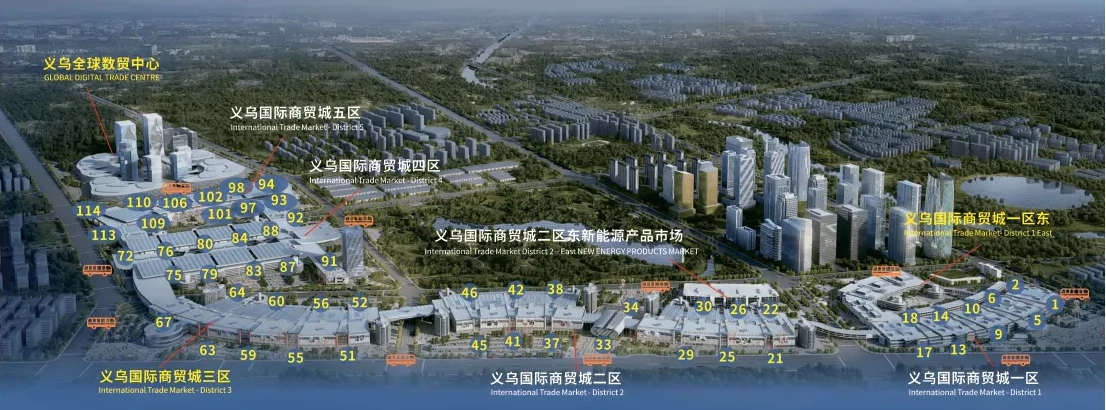
District 2 questions
Where should I start for bags or umbrellas?
Start on 1F, then confirm the current booth address for your specific product. To make your comparisons more useful, bring dimensions and a reference sample.
Which floor has hardware and small appliances?
According to the official directory, tools, electrical products and locks are on 2F, while kitchen and bathroom hardware, small appliances and electronics-related categories are on 3F. To find a particular booth, use the supplier’s full address.
Is District 2 East the same address as District 2?
No. District 2 East is the eastern extension, also called the New Energy Products Market. Its directory places home-improvement hardware on 1F, new-energy products on 2F, and smart hardware and appliances on 3F. Because the main building has a different floor directory, save the extension name, entrance, floor, unit, booth number and location pin.
Can I mix colors, sizes or models in one order?
It depends on the supplier, so ask each one to quote the mix you propose. Minimums may apply separately to each model, color, size or custom version. A total quantity alone may not show whether your order is acceptable.
Does a factory direct-sales booth guarantee the lowest price?
Not necessarily. A directory label does not replace checking the supplier and the offer. Ask who makes the item, who handles the order and which specification the price covers. Then compare equivalent products on equivalent terms.
Can I order an appliance from the sample on display?
Not before you confirm the exact model, destination configuration, included accessories, documentation and approved sample. The display version may differ from the version you need.
Do I need to visit 5F to buy products?
Not necessarily. It is listed as a procurement service and specialty display area. Focus first on the floors relevant to your goods, and arrange a specific service or supplier meeting there if you need one.
Can the PDF guide replace booth navigation?
No. The PDF gives an offline overview of the districts and floors, but it is a brochure reference, not a live booth directory. Check the supplier’s current location before visiting.
Sources & editorial notes
- Market directory: Official Chinagoods District 2 introduction ↗
- Eastern extension: China Yiwu Net District 2 East floor report ↗
- Map: Lance District 2 map
- Download: Two-page market guide
Main-building floor categories follow the official introduction, and eastern-extension categories follow the April 2024 opening report. Sources were checked on October 3, 2026. Product checks and route suggestions are Lance editorial guidance. Confirm booth locations, product availability and order terms with individual suppliers. The PDF is an offline reference.

Gary
10+ years of experience in supplier management, sharing practical insights on supplier selection and sourcing relationships.


